
Qatar ID Check – MOI Qatar ID Status Check Online Step by Step Guide

Qatar ID Check is very simple and can be done directly on the Ministry of Interior (MOI / وزارة الداخلية) website. Just enter your 11-digit QID number, and the system will instantly show your Qatar ID validity status. This quick online check helps you maintain smooth access to important services such as banking, government offices, healthcare, and job-related procedures.
By checking your QID status regularly, you can stay updated, renew on time, and avoid any last-minute issues or service interruptions.
Qatar ID Status Check
Enter your 11-digit Qatar ID (QID) and click “Check Status” to open the official MOI portal.
This tool only helps you open the official MOI Qatar page. Final status will be shown on the MOI website.
Check Qatar ID Status by ID Number on the MOI Website
The Qatar ID Check process is quick and easy. Simply follow these steps:
Step 1: Visit the official Ministry of Interior (MOI) website.
Go to the official MOI website to check your Qatar ID status.
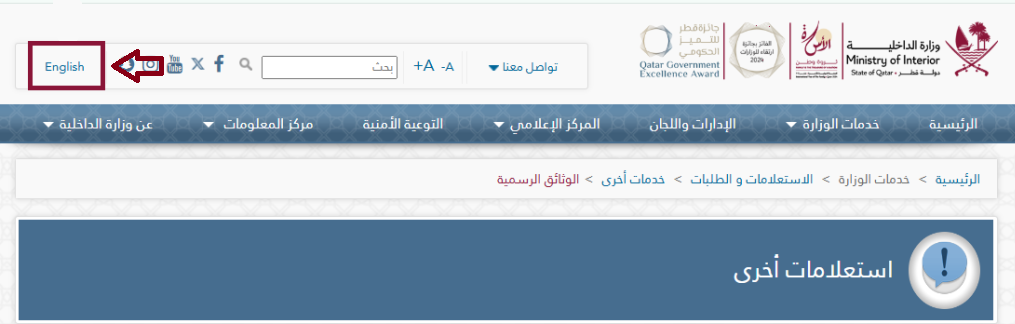
Step 2: Choose Your Preferred Language
The MOI website provides two language options 1st one is English and 2nd Arabic. Simply select the language you are most comfortable using.
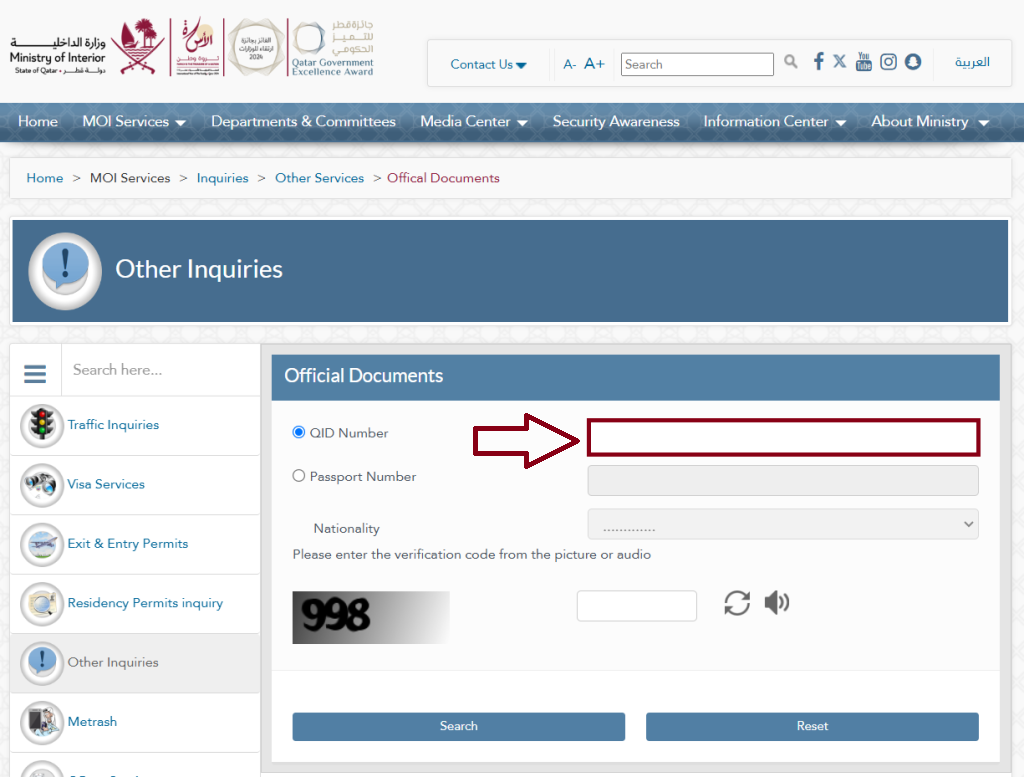
Step 3: Enter Your QID Number
Type the 11-digit QID number exactly as it appears on your Qatar ID card.
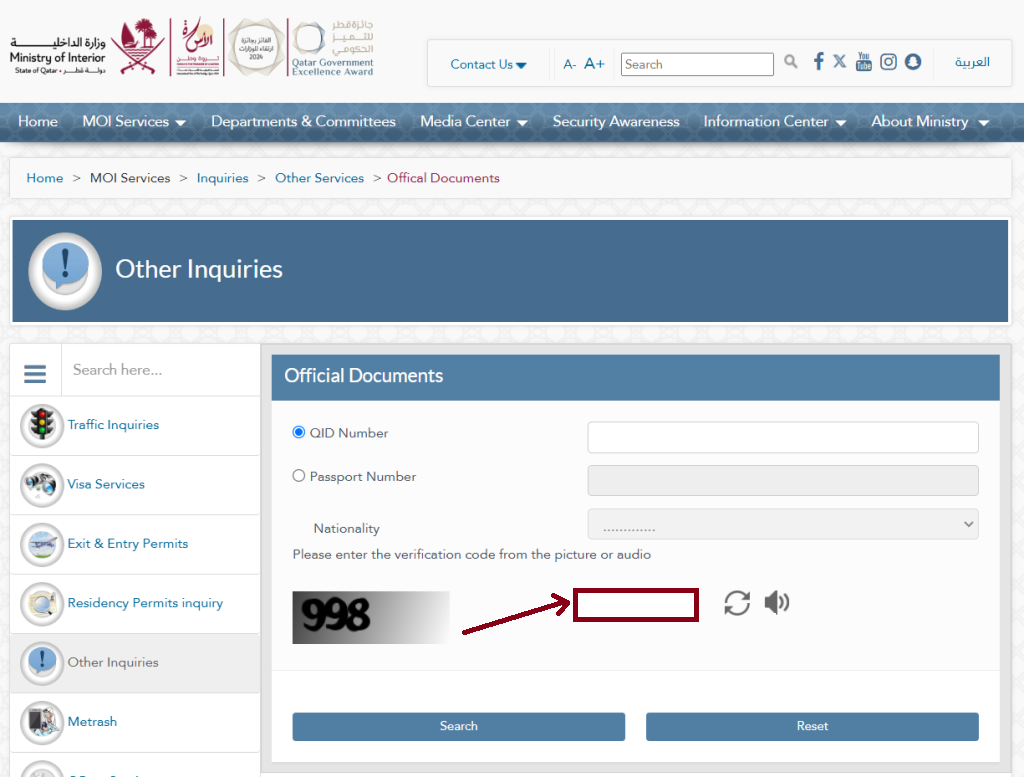
Step 4: Verify the Captcha
Enter the verification code shown in the image or listen to the audio and type the code correctly.
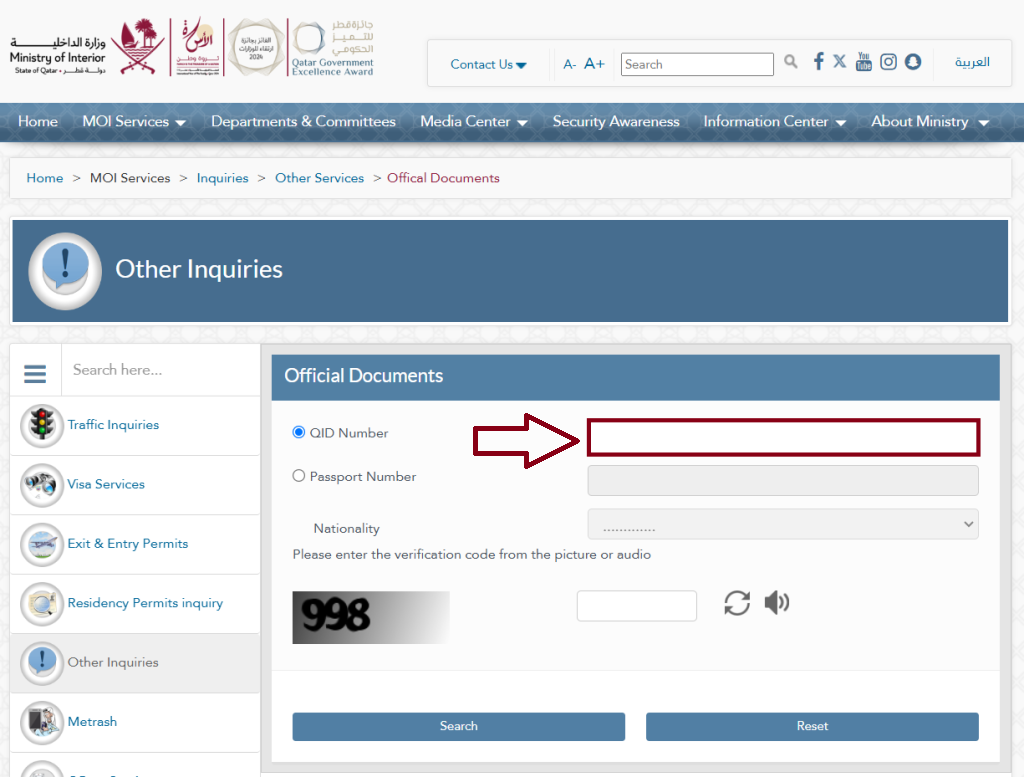
Step 5: Click the “Search” Button
After entering your QID number and completing the captcha, simply click on the “Search” button to continue.
Step 6: View Your Status
Once you enter your details, your QID status will appear on the screen. You can easily check the expiry date of your Qatar ID, passport, residency permit, and other official government documents.
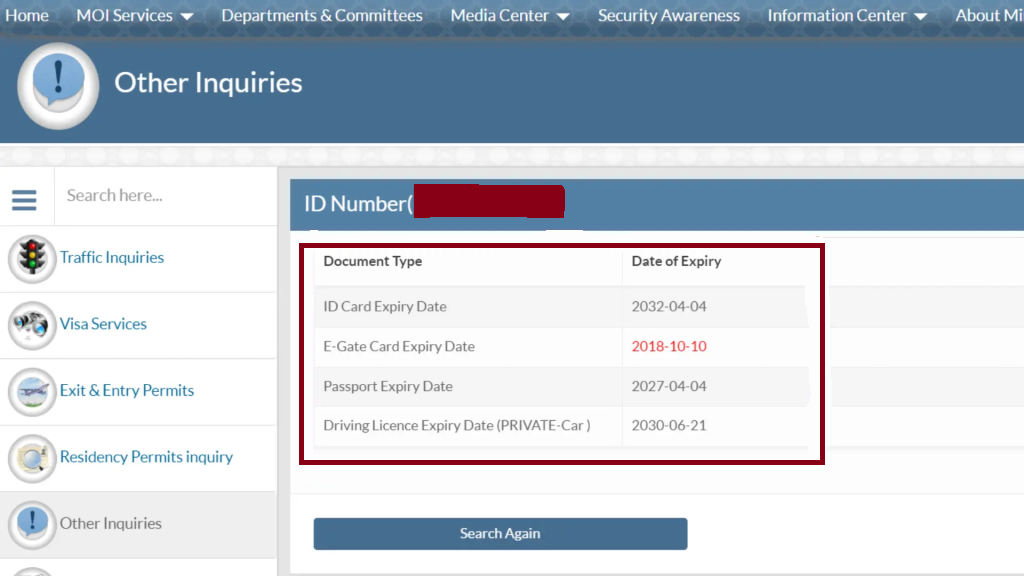
Important: Make sure you enter your ID number correctly. If you see an error or no results, refresh the MOI website and try again by entering your QID number accurately.
Qatar ID Status Check Through Passport Number
Checking your Qatar ID is very easy, just follow these simple steps.
Step 1: Go to the Official MOI Website
Open the Ministry of Interior official website (www.moi.gov.qa) to check your Qatar ID details.
Step 2: Choose Your Preferred Language
The MOI website allows you to select your language. You can switch between English and Arabic, so choose whichever language you find easier to use.
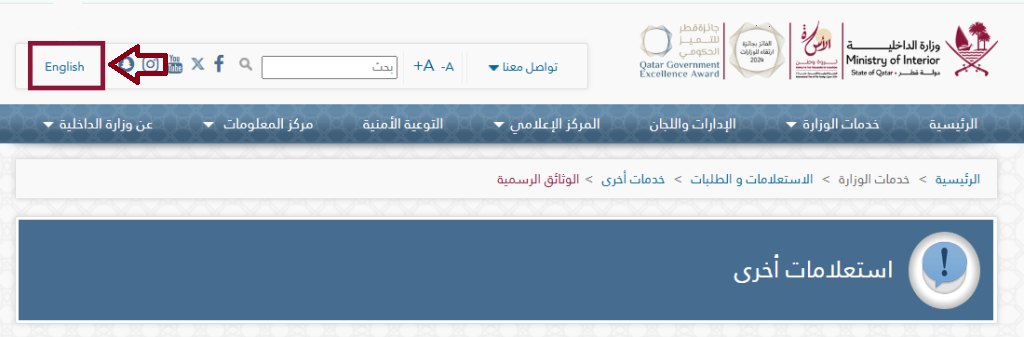
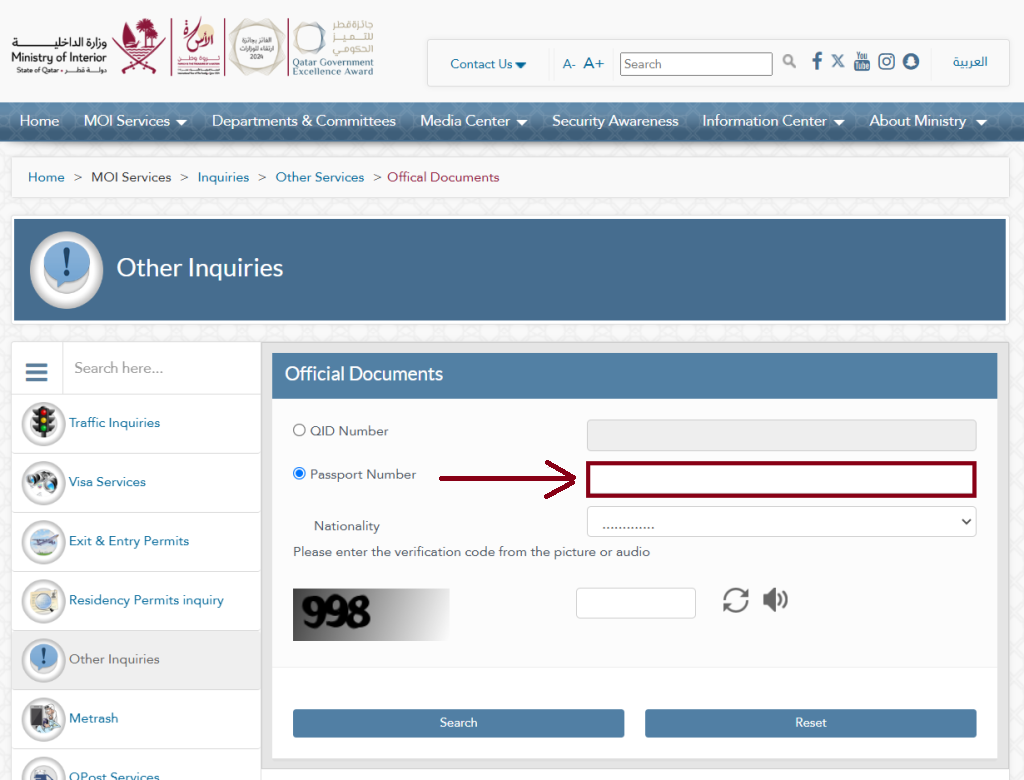
Step 3: Enter Your Passport Number
Please type your Passport Number in the required field.
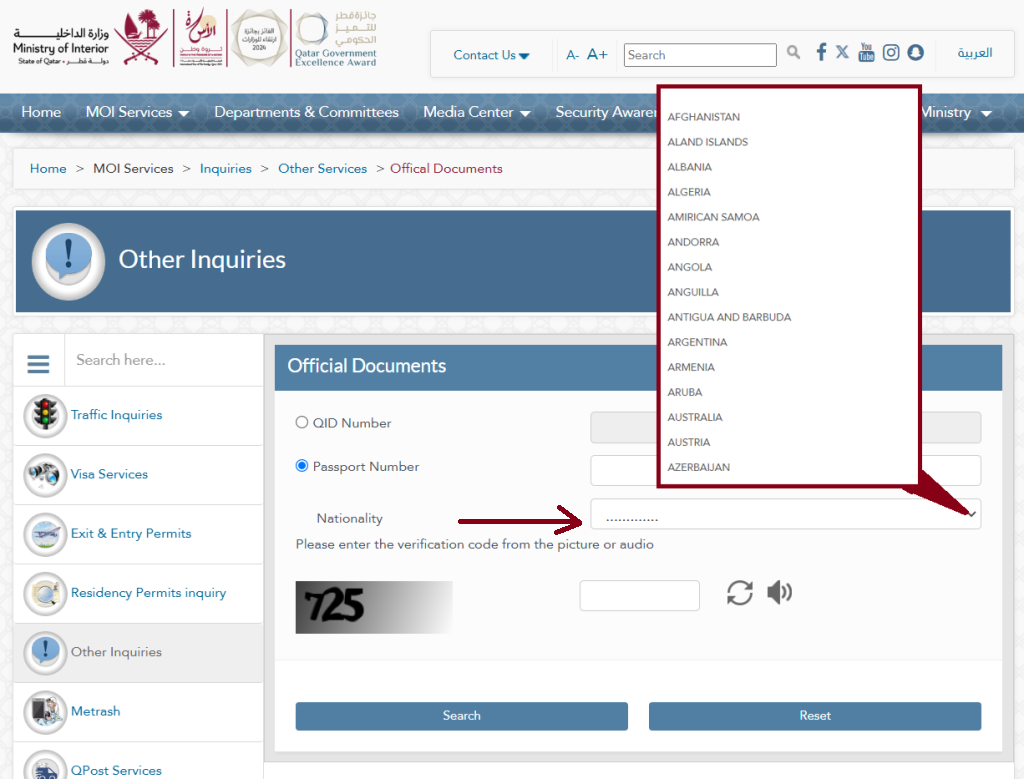
Step 4: Choose Your Nationality
Open the dropdown menu and select your nationality from the list.
Step 5: Complete the Captcha Verification
Type the verification code shown in the image or listen to the audio and enter the code.
Step 5: Press the “Search” Button
After entering your Passport number and completing the captcha verification, simply press the “Search” button to continue.
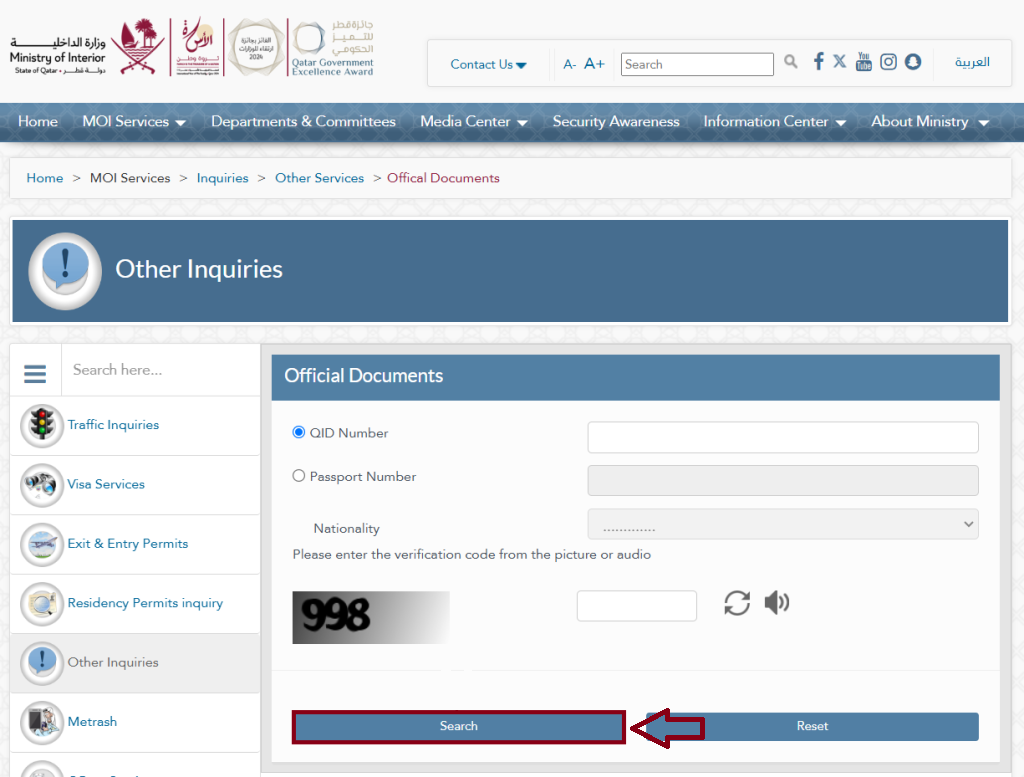
Important Note: Make sure you enter your passport number correctly. If you see an error or no result, refresh the MOI website and type your passport number again to restart the search.
Qatar ID Check Through the Metrash2 App
The Metrash2 app allows Qatar residents to access important Ministry of Interior (MOI) services directly from their mobile phones—completely free. With this app, you can easily check your Qatar ID (QID) status, driving license details, vehicle permit information, traffic violation updates, and much more without visiting any office.
Follow these simple steps to view your Qatar ID status using the Metrash2 application:
Step 1: Install the Metrash2 App
Download the Metrash2 app from the Play Store or App Store. Once the installation is complete, you can open and use the app on your mobile device.


Step 2: Log in to the Metrash2 App
Sign in using your QID or Face ID. After a successful login, you will receive a confirmation message from Metrash2.
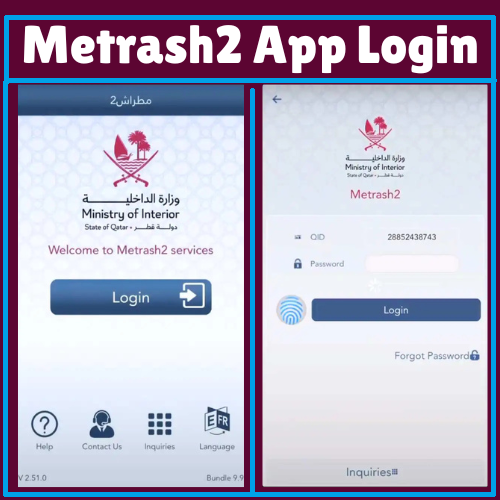
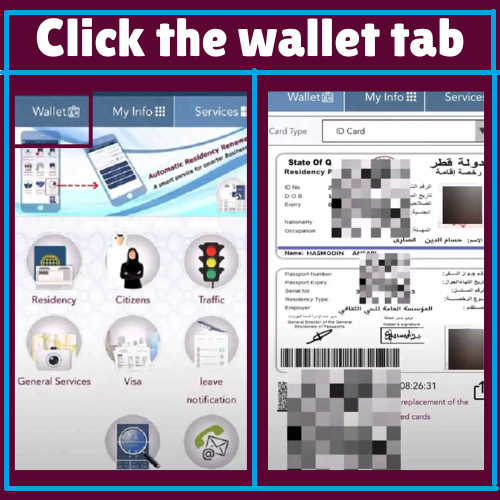
Step 3: Click the Wallet Tab
Open the Wallet tab. A new screen will appear showing all the government documents linked to your account.
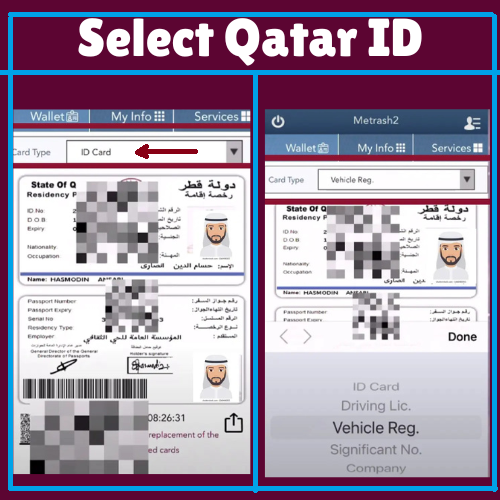
Step 4: Select Qatar ID
Choose ID Card as the card type. If you want to check a different document, simply pick the correct option from the drop-down menu.
Qatar ID Check Online by Video Guide
Significance of the Qatar ID Card
A Qatar ID (QID) serves as your official proof of identity in Qatar. It includes key details such as your name, photo, nationality, address, ID number, signature, and sponsor information. Your residency status is also recorded on the card.
The 11-digit QID number is connected to government systems, allowing authorities to verify your personal details quickly. You must have a valid QID to open a bank account, apply for a driver’s license, travel outside Qatar, access government services, and receive various benefits.
What is a Qatar ID?
A Qatar ID (QID), also known as the Qatar Identity Card, is an official identification document used by all residents of Qatar. Both Qatari citizens and expatriates must have a valid QID for legal identification and access to government services.
What is a Qatar ID Number?
The Qatar ID number is an 11-digit unique number given to every resident of Qatar, regardless of nationality. This number is used for identity verification, official records, and all government-related services.
QID Number Meaning and Structure
If you are unsure where to find your QID number, simply check your Qatar ID card. You will see an 11-digit number printed in the center of the card.
For example:
26863400752
This 11-digit QID is divided into four sections, and each section has a specific meaning.
Century of Birth
2 = Born before 2000
3 = Born after 2000
Year of Birth
Example: 68 = 1968
ISO Country Code
Nationality code of the holder
Sequence Number
Unique number for YOB + nationality
Part 1: The first digit of your QID shows the century you were born in. If you were born between 1900 and 1999, your QID will start with 2. If you were born in the year 2000 or later, it will start with 3.
Part 2: The second and third digits represent your Year of Birth (YOB). For example, if you were born in 1989, these digits will be 89.
Part 3: The fourth, fifth, and sixth digits show your nationality, based on your country’s ISO (International Organization for Standardization) code. Each country has its own ISO number. For example, the ISO code for Turkey is 792.
Part 4: The last five digits are a unique sequence number, formed using your birth year and ISO code to create a unique identification number for each individual.
Qatar ID Required Document
- New residents receive their Qatar ID (QID) after completing the medical test and fingerprinting process.
- The sponsor must submit the visa, passport, photograph, and required fee to the MOI service center.
- Once the documents are submitted, the MOI prints the Qatar ID card, usually on the same day.
How to Apply for a Qatar ID (QID)?
Medical Test & Blood Group Check
Within 2–5 days of arriving in Qatar, you’ll undergo a medical examination at an approved health center. This test includes an X-ray and a blood test to assess your general health and confirm your blood group.
Fingerprint Registration
After you pass the medical test, you must visit the Ministry of Interior (MOI) to complete your fingerprinting as part of the security verification process.
Residence Permit & Qatar ID Issuance
Once both the medical exam and fingerprinting are completed, your sponsor will submit your application for a Residence Permit. After approval, your Qatar ID card will be officially issued.
QID (Qatar ID) Fees
| Service | Duration | Costs(QAR) |
|---|---|---|
| Smart Card | – | 100 |
| Conventional ID Card | – | 100 |
| E-Gate Services | 1 year | 100 |
| E-Gate Services | 2 years | 150 |
| E-Gate Services | 3 years | 200 |
QID (Qatar ID) Processing Time
After submitting your application, you can expect a response within 3 to 4 weeks. Once your application is approved, your Qatar ID will be ready for collection at the designated MOI service center.
Benefits of QID (Qatar ID)
Having a Qatar ID offers many important advantages for residents:
| Benefit | Description |
|---|---|
| Banking | Needed to open and manage bank accounts in Qatar. |
| Travel | Supports smoother travel across GCC countries. |
| Healthcare | Makes it easier to receive treatment in public and private hospitals. |
| Utilities | Required to activate electricity, water, and other essential services. |
| Employment | Mandatory for legal employment and work contracts. |
| Driving License | Needed to apply for a Qatari driving license. |
| Government Services | Allows access to all major government services and facilities. |
| Property Rental | Necessary for renting houses, apartments, or offices. |
| Education | Required for enrolling children in schools and universities. |
| Legal Residency | Serves as official proof of your legal resident status in Qatar. |
Qatar ID Contact Information
- Phone: 2366666
- E-mail: [email protected]
- Web: www.portal.moi.gov.qa
FAQs About Qatar ID Check
How can I check my Qatar ID details?
Check Qatar ID Status on the MOI Website
- Go to the official MOI Qatar website and open the Inquiries section.
- Select “Other Inquiries”, then choose “Official Documents.”
- Enter your 11-digit Qatar ID number in the required field.
- Fill in the verification code and click “Inquire” to view your QID status.
How long is the Qatar ID valid for?
1. Validity for Citizens:
Qatari citizens receive an ID card that remains valid for 10 years.
2. Validity for Residents:
For expatriate residents, the Qatar ID is valid for 5 years. It must be renewed before it expires to continue accessing government services in Qatar.
How do I know if my ID is ready for collection in Qatar?
How to Check Qatar ID Status Using Your Passport Number (MOI 2025 Guide)
Step 1: Open the official MOI (Ministry of Interior) Qatar portal.
Step 2: Select your preferred language from the menu.
Step 3: Enter your passport number in the required field.
Step 4: Choose your nationality from the dropdown list.
Step 5: Complete the security captcha to verify you are not a robot.
Step 6: Click on “Search” to view your Qatar ID status.
How do I check if I am banned in Qatar?
You can check your travel ban status in Qatar through the Metrash2 app or the Ministry of Interior (MOI) website. Just log in, go to the “General Services” section, and select the “Travel Ban Inquiry” option. Enter your QID or passport number to view your current travel ban status.
Can I leave Qatar without an exit permit?
Most residents can leave Qatar without needing an exit permit. However, employers are still allowed to require an exit permit for a small percentage of their workforce (up to 5%). In addition, anyone who has outstanding debts or legal cases is restricted from leaving the country.
It is advisable to check your exit status online or through the Ministry of Interior to confirm whether an exit permit is required before traveling.
How much money to renew Qatar ID?
Qatar ID renewal fees depend on your sponsor and visa category.
Generally, company-sponsored employees pay around QR 1,000 per year, while family-sponsored residents pay about QR 500 per year. For domestic workers, the renewal fee is typically QR 300 per year.
Qatari citizens and GCC nationals usually do not have to pay any renewal fee.
If the renewal is delayed, a daily fine of QR 10 applies.

